


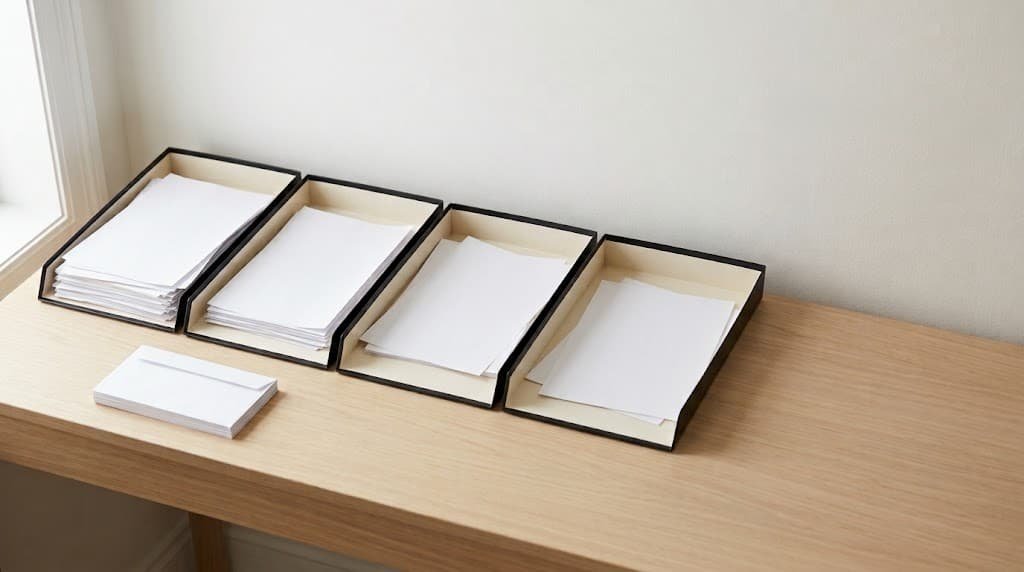
The moment this fixes is standing at the counter with the day’s mail in one hand, sorting it into a pile that already has forty things in it, next to a pile from three weeks ago that never got dealt with. Nothing in either pile is urgent enough to demand attention right now, which is exactly why it accumulates — every individual piece loses to whatever else is happening, and the pile just keeps being where paper goes to wait.
This system replaces the pile with four short-lived categories, sorted the moment paper arrives rather than set down for later. It takes about ninety seconds per piece of mail and one fifteen-minute session a week, and the actual test of whether it works is simple: does the counter ever have paper sitting on it for more than a week without you knowing exactly what it is and why it is still there.
What This System Actually Buys You
Specifically: knowing, within five seconds of looking at any surface in your house, whether there is anything on it that needs action. That is the actual product. Not a paperless house, not a filing system — just the elimination of the “is that important or can I ignore it” question that a pile forces you to ask every single time you walk past it.
It buys you the bill paid on time because it went somewhere specific rather than into a stack where due dates blur together. It buys you the form found in ten seconds instead of the twenty-minute search through three rooms, because there is exactly one place forms go. It removes the recurring low-grade cost of a counter that always has something on it — not because any single piece is heavy, but because a pile of unsorted paper is a decision deferred every time you see it, and deferred decisions carry a small tax paid on repeat.
What It Won’t Fix
It will not fix genuinely disorganized finances — if bills are being missed because of the amounts rather than because they got lost on a counter, sorting the paper faster does not touch the actual problem. This system is about location, not budgeting.
It will not fix mail you are avoiding on purpose. Paper that gets accurately sorted into “needs action” and then sits there for six weeks anyway is not a sorting failure — it is something else, and no container fixes an avoided decision.
It will not survive being set up once and never touched. The four categories only work if something empties them regularly; a system with inflow and no outflow is just a more organized pile, and organized clutter is still clutter.
If your household genuinely receives almost no paper mail, this solves a problem you do not have. It exists specifically for households where physical paper still arrives regularly enough to accumulate.
What You’ll Need
Four shallow trays or folders, stackable or side by side — the kind found at any office supply store, nothing specialized. A shredder or a bag reserved for paper with personal information on it. One drawer or small box for the archive category, covered in the setup steps. Fifteen minutes weekly, on a day you can name specifically rather than “sometime.”
You do not need a filing cabinet, a labeling machine, or a scanning system, though a scanning app on your phone is genuinely useful for the archive category and covered separately below. The four trays are the entire physical setup, and resisting the urge to build something more elaborate than that is most of what keeps this running.
How to Set It Up
- Label four trays: Act, Waiting, File, Shred. Fifteen minutes, including finding the trays. Act holds anything requiring a response from you within the week. Waiting holds anything you cannot act on yet — a form needing someone else’s signature, a package tracking a delivery. File holds anything you need to keep but do not need to act on. Shred holds anything with personal information that is finished with.
- Put the trays where mail actually enters the house, not in an office down the hall. If mail comes through a front door and lands on a hallway table, the trays go on that table, not somewhere tidier that requires carrying paper past three rooms to reach.
- Sort today’s mail immediately as the test run, ninety seconds per piece. Junk goes straight to recycling, not into any tray. Everything else gets a tray, decided the moment you touch it, before you set anything down on the counter.
- Set the weekly session on a specific day and put it on the calendar, fifteen minutes. This is where Act items either get done or get moved to Waiting with a note about what you are waiting on, where File items go into the archive drawer, and where Shred gets emptied.
- Check the Waiting tray specifically during the weekly session, not just File and Act. Waiting is the tray most likely to silently accumulate, because nothing in it demands attention — it is designed to be ignored until the thing you are waiting on arrives, which means it needs a deliberate check rather than relying on it to announce itself.
- Empty the Shred tray into an actual shredder or a sealed bag weekly, not whenever it gets full. A Shred tray that only gets emptied when overflowing becomes a fifth pile with a different name.
The One Part That Decides Whether It Lasts
Whether paper gets sorted the moment it arrives, or gets set down “for now” with the intention of sorting it later.
Setting mail down unsorted, even once, is how the system quietly reverts to a pile. The paper set down “for now” sits next to the trays rather than in one, and the next piece of mail lands beside it rather than being sorted either, because there is already an unsorted stack establishing that this spot is where mail goes to wait. Within a week the trays are still there, empty and ignored, next to a pile that has fully reconstituted itself.
The mechanism that prevents this is small and specific: never touch a piece of mail twice before it is in a tray. Pick it up once, decide its category in the same motion, put it in the tray. The moment you set something down intending to deal with it “in a second,” the system has already started to fail for that piece, and pieces accumulate the same way every time.
The honest test: is there ever loose paper on the counter, even for a day, that has not yet reached a tray? If yes, the failure point is not the trays or the categories — it is the ninety seconds at the moment of arrival, and that is the only part of this system actually worth being strict about.
Small Adjustments That Help
Write a one-line note on anything going into Waiting — what you are actually waiting for and roughly when. “Waiting” without a note becomes indistinguishable from “forgotten” within two weeks, and the note is the only thing that lets you check the tray usefully rather than just staring at a stack wondering what any given item is for.
Photograph anything going into File with a phone before it goes into the drawer, if the archive drawer is not immediately searchable. A photo takes ten seconds and means you can search for a document by date or by remembering roughly what it looked like, rather than digging through a physical drawer for something you filed eight months ago.
Keep a small stack of pre-addressed return envelopes near the trays if you regularly mail things back — payments, forms, RSVPs. Removing the step of finding an envelope is often the actual reason an Act item stalls for a week despite taking two minutes to complete.
Put the shredder or shred bag directly beside the trays, not in a different room. A Shred tray that requires a trip to empty gets skipped on a day with fifteen minutes and not sixteen, and it is the tray most likely to be shortchanged first when time is tight.
When It Falls Apart
Travel breaks the weekly session outright — nobody is home to receive mail or run the fifteen minutes. Mail typically piles up at the door or with whoever is collecting it, and that is fine; do not try to sort remotely. On the first day back, run the weekly session as normal, expecting it to take closer to thirty minutes for the backlog, then return to the regular fifteen the following week.
A period of heavier-than-usual mail — tax season, a move, a medical claim being processed — breaks the assumption that everything fits into four simple categories. When this happens, add a fifth temporary tray specifically for that situation, clearly labeled, and fold it back into File or Shred once the situation resolves. Trying to force a temporary flood into the permanent four categories is what causes people to abandon the whole system during exactly the period they need it most.
Skipping two or three weekly sessions in a row — because of a busy stretch, not travel — breaks the Waiting and File trays specifically, since Act items tend to get handled reactively even without the formal session, but the other two only empty during it. Restarting after a gap like this takes one session, roughly thirty minutes instead of fifteen, and does not require re-sorting anything that already reached a tray correctly.
Adapting It to Your Household
Living alone, the whole system is genuinely as described, and the weekly session is the only part worth protecting deliberately — there is no coordination step to add or remove.
With more than one adult receiving separate mail, either share all four trays or give each person their own Act tray while sharing File and Shred; a fully separate four-tray system per person usually creates more trays than the counter can hold and defeats the purpose. Shared Waiting and File in particular tend to work fine because those categories rarely require the kind of privacy separate mail sometimes does.
With children old enough to receive their own mail — school correspondence, camp forms — give that specific mail its own small tray rather than folding it into the adult Act tray, since school paperwork usually has its own rhythm of deadlines that gets lost when mixed with bills and personal correspondence.
In shared housing where mail is not shared, the trays apply to personal mail only, and the shared Shred tray is worth having regardless — everyone benefits from a common place to dispose of paper with personal information on it, even when nothing else is shared.
With an unpredictable schedule where the weekly session cannot anchor to a fixed day, anchor it to a recurring event instead — the day groceries are typically bought, the day before trash collection — so the trigger is an event rather than a specific date that shifts underneath an irregular week.
A Simple Version to Start With
If four trays and a weekly session feels like more setup than you want this week, here is what actually matters.
| Do This | Time | Why It Matters Most |
|---|---|---|
| Get two trays: Act and Everything Else | 5 minutes | Two categories is enough to end the pile entirely |
| Sort mail the moment it arrives | 90 seconds per piece | The one habit the whole system depends on |
| Empty Act weekly, same day | 10 minutes | Prevents the one tray that has real deadlines from stalling |
Two trays instead of four loses some precision — Waiting and File end up mixed together — but it stops the counter pile completely, which is most of the actual benefit. Split File and Waiting back out once the two-tray version has held for a few weeks.
Where to Start Today
The case for this is specific: paper that gets a place to go the moment it arrives never becomes a pile, and a pile is what actually costs time and low-grade attention — not the paper itself. That is the entire mechanism, and it works because the decision happens once, early, instead of being deferred and paid for repeatedly.
Grab two trays or two boxes today and label one of them Act. That single tray, used consistently, is worth more than a perfect four-category system set up and abandoned.